How to Rent a Phone Number for SMS Verification
How to Rent a Phone Number for SMS Verification
Rent a phone number for days or months and receive SMS codes from any app. How to rent, extend, auto-renew and get refunds with Bitcall Long-term Number.
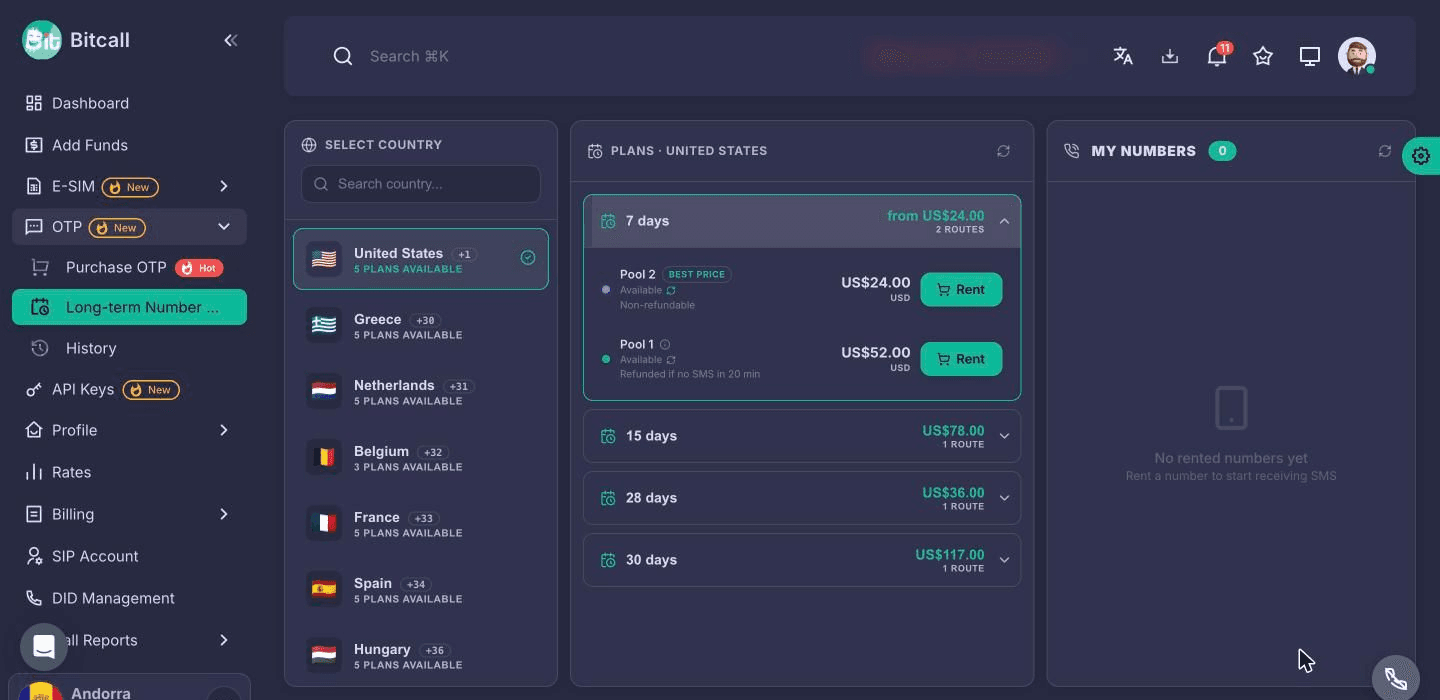
What is a long-term number?
A long-term number is a phone number you rent and keep for a set time, from 1 day up to 1 year depending on the country. It receives SMS from any app or website for the whole time, so you can log in again later, reset a password or receive more verification codes on the same number.
You find it in your Bitcall panel under OTP → Long-term Number. The number only receives SMS: it can't send SMS or make or receive calls.
Long-term number or OTP number?
Bitcall has two ways to get a number for SMS verification. Pick the one that matches what you need:
| OTP number | Long-term number | |
|---|---|---|
| Best for | One code, right now | Codes now and later on the same number |
| How long you have it | About 15–20 minutes | From 1 day up to 1 year |
| Codes | One | As many as arrive during your rental |
| If no code arrives | Refunded | Depends on the pool, see Refunds below |
| Where | OTP → Purchase OTP | OTP → Long-term Number |
For a single code, see How to Purchase and Use OTP Services.
Before you begin
- A Bitcall account (create one if you don't have one yet)
- Enough balance for the plan you pick (how to add balance)
Step 1 — Open Long-term Number
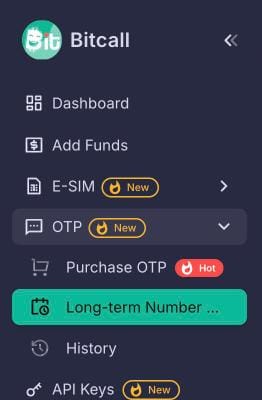
Log in to your Bitcall panel. In the left menu, open OTP and click Long-term Number.
Step 2 — Pick a country and a plan
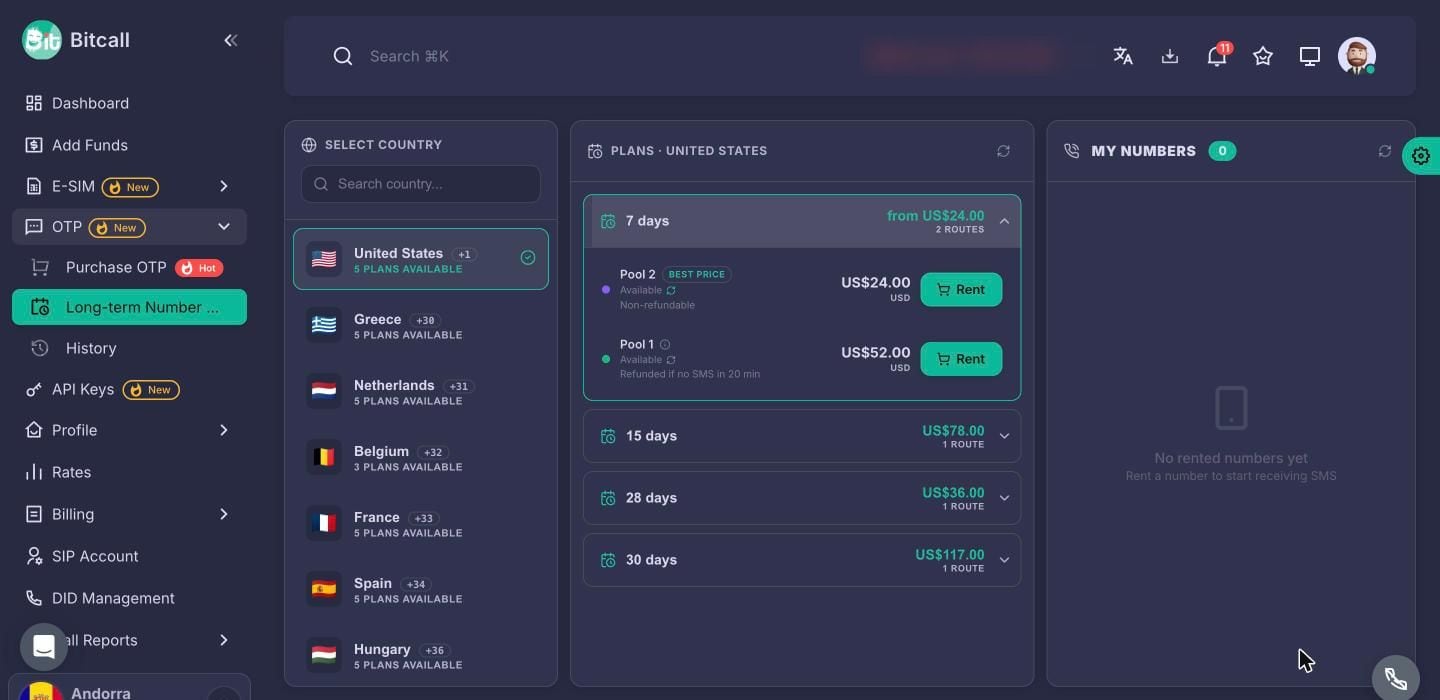
Choose a country on the left. Its plans are grouped by length, for example 7 days or 28 days. Open a length to see the pools that offer it. Each pool shows:
- its price (Best price marks the cheapest)
- its refund rule: Refunded if no SMS in 20 min, Refundable within 2 h if no SMS or Non-refundable
Click Rent. Your number appears in My Numbers on the right. You choose the country, pool and length; the number itself is given to you when you rent.
Step 3 — Receive your SMS
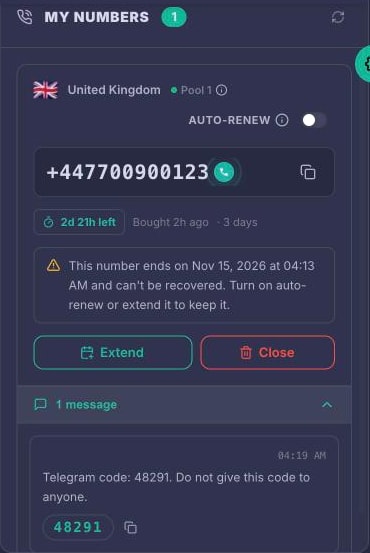
Enter the number in your app and request the code by SMS. Open the messages on the number to see each SMS and its code, and copy the number or the code with one click.
Pool 1 and Pool 2: what's different
Numbers come from two pools. They have their own prices, plan lengths and rules:
| Pool 1 | Pool 2 | |
|---|---|---|
| Plan lengths | 1 to 30 days | 1 day to 1 year |
| If no SMS arrives | Refunded automatically after 20 minutes | 28-day and longer plans: Cancel & refund within 2 hours. Shorter plans: non-refundable |
| Cancel early yourself | Before the first SMS, from 2 minutes after buying (not US numbers) | Only through Cancel & refund |
| Extend | After the first SMS. Some countries can't be extended | At least 2 days before the end |
| Auto-renew | After the first SMS | Any time before the renewal window closes |
| SMS per day | — | Up to 25 |
Refunds: when you get your money back
You only get a refund if no SMS has arrived on the number. Once an SMS has arrived, the number has been used.
Pool 1
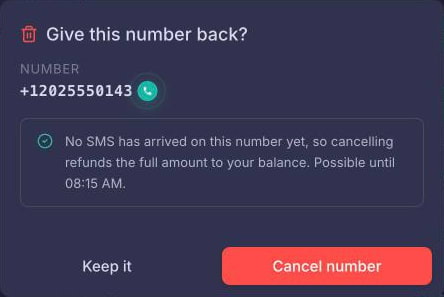
- If no SMS arrives within the first 20 minutes, the number is cancelled and fully refunded automatically.
- Before the first SMS you can also cancel it yourself, from 2 minutes after buying: click Close, then Cancel number. You get a full refund. US numbers can't be cancelled early.
- After an SMS has arrived, you can still give the number back early with Close, but the remaining time is not refunded.
Pool 2
- Plans marked Refundable within 2 h if no SMS (28 days or longer) can be cancelled with Cancel & refund from 5 minutes to 2 hours after buying, if no SMS has arrived.
- Plans marked Non-refundable can't be refunded.

Extend your number
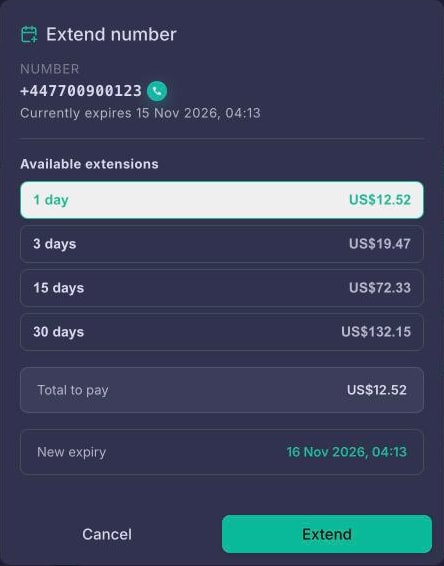
Click Extend, choose the extra time, check the total and the new expiry date, and confirm. The extra time is added to the current end date.
- Pool 1: Extend opens after the first SMS arrives.
- Pool 2: extend at least 2 days before the number ends. We send you a notice before that point.
- Some numbers can't be extended. Their plan says Not extendable.
Auto-renew
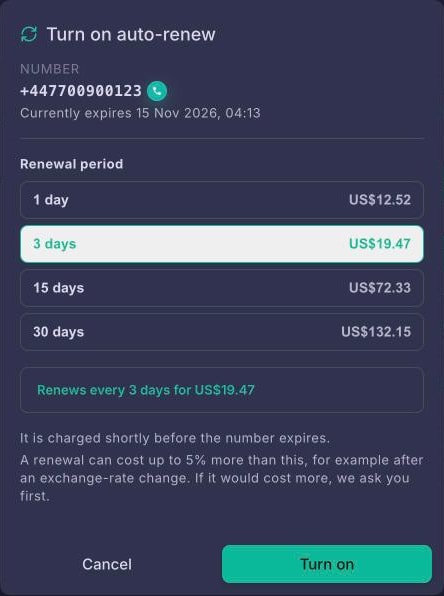
Switch Auto-renew on in the number's card, choose the renewal period and click Turn on. The number is then renewed and charged shortly before it ends, every term, until you switch it off.
- A renewal is charged at the price on that day. It can cost up to 5% more than the amount you approved, for example after an exchange-rate change. If it would cost more, we pause the renewal and ask you to approve the new price with Change.
- If your balance is too low, we try again and tell you. Top up, and it renews on the next try.
- If the renewal can't go through before the number ends, the number ends.
- Pool 1: auto-renew can be switched on after the first SMS arrives.
Notifications and history
We tell you when the number is ready, when an SMS arrives, before it ends, and about every renewal or refund. In your notification preferences, choose email, browser or Telegram for Rental updates and Rental messages.
Your past numbers and the SMS they received are under OTP → History → Long-term Number History.
The SMS doesn't arrive: what to check
- Wait about 2 minutes. New SMS show up within about 2 minutes of arriving.
- Check the number format. The number is shown with its country code (for example +44). If the app already has the country selected, enter the number without the country code.
- Ask for an SMS, not a call. The number can't receive calls, so choose the SMS option if the app offers both.
- Try another country or pool. Some apps don't accept virtual numbers, or numbers from some countries.
- Pool 2 limit: a Pool 2 number receives up to 25 SMS a day.
If nothing arrives: on Pool 1 you're refunded automatically after 20 minutes. On Pool 2, use Cancel & refund within 2 hours if your plan shows it.
Still stuck? Contact support with the number and the time you requested the code, so we can check it.
Frequently asked questions
No SMS arrived. Do I lose my money?
Not on Pool 1: the number is refunded automatically after 20 minutes. On Pool 2, use Cancel & refund within 2 hours if your plan shows it.
Can I get a refund after I received a code?
No. Once an SMS has arrived, the number has been used.
My number ended. Can I get it back?
No. Ended numbers can't be recovered. Turn on auto-renew if you will need the number again.
Can I choose the number?
You choose the country, the pool and the length. The number itself is given to you when you rent.
Can I use it for WhatsApp, Telegram or other apps?
The number receives SMS from any app. Some apps don't accept virtual numbers, so we can't promise that a specific app works.
Can I make calls or send SMS?
No. A long-term number only receives SMS.
Which currency am I charged in?
Your account's currency. The price is shown before you click Rent.
Why are Pool 1 and Pool 2 prices different?
The pools are different number sources with their own prices, plan lengths and rules. Pick the one that fits.
Related articles
- How to Purchase and Use OTP Services — one verification code, right now.
- How to Add Balance to Your Bitcall Account — card, PayPal and crypto top-ups.
- Static Crypto Wallet — a permanent crypto deposit address for your balance.
- How to Contact Bitcall Support.
How to Purchase and Use OTP Services
No next post
On This Page
What is a long-term number?
Long-term number or OTP number?
Before you begin
Step 1 — Open Long-term Number
Step 2 — Pick a country and a plan
Step 3 — Receive your SMS
Pool 1 and Pool 2: what's different
Refunds: when you get your money back
Extend your number
Auto-renew
Notifications and history
The SMS doesn't arrive: what to check
Frequently asked questions
Related articles