Everything you need to reach the Bitcall team by phone, WhatsApp, email, live chat, or Microsoft Teams. All support is handled by real technical experts, not bots.
What You Will Need
Your Bitcall account details (if your question is about your account).
A clear description (logs or screenshots) if reporting a technical issue.
Contact Options
1. Phone and WhatsApp (Fastest)
You can call or send a WhatsApp message to our primary support line: +33 7 56 99 09 82
2. Live Chat (Dashboard)
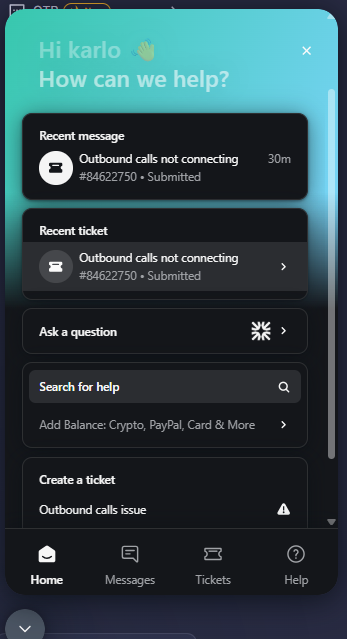
The fastest way to get help while working is the Intercom Live Chat. Click the chat bubble in the bottom right corner of the panel.bitcall.io dashboard.
3. Email Support
For billing inquiries, partnership requests, or sending large log files: [email protected]
4. Microsoft Teams (B2B & Partners)
If you are a reseller or technical partner, we recommend using Microsoft Teams for ongoing communication:
Which Channel Should I Use?
To get the fastest answer, choose the right channel for your needs:
Urgent Technical Problems: Use Live Chat or WhatsApp.
Billing or Payment Issues: Use Email or Live Chat.
Sending Logs or Reports: Use Email for large files.
Partnership & Reseller Support: Use Microsoft Teams.
General Questions: Use Live Chat.
Expected Result
You are connected with a technical team member who can assist you. Most requests are answered within a few hours during business days.
Troubleshooting
I emailed but no reply: Check your spam folder. If it's been more than 4 hours, reach out via WhatsApp for an immediate status check.
Chat widget is missing: Ensure you have disabled any "Ad-Blockers" that might prevent the Intercom widget from loading.
After Hours: If you message us at night, your request will be queued and answered first thing in the morning.
How to Request a Feature, Route, or Integration +
No next post