Static Crypto Wallet: Your Permanent Crypto Deposit Address
Static Crypto Wallet: Your Permanent Crypto Deposit Address
Generate a permanent crypto deposit address on Bitcall once, then reuse it forever. Send BTC, USDT and more any time — your balance updates automatically.
What is a Static Wallet?
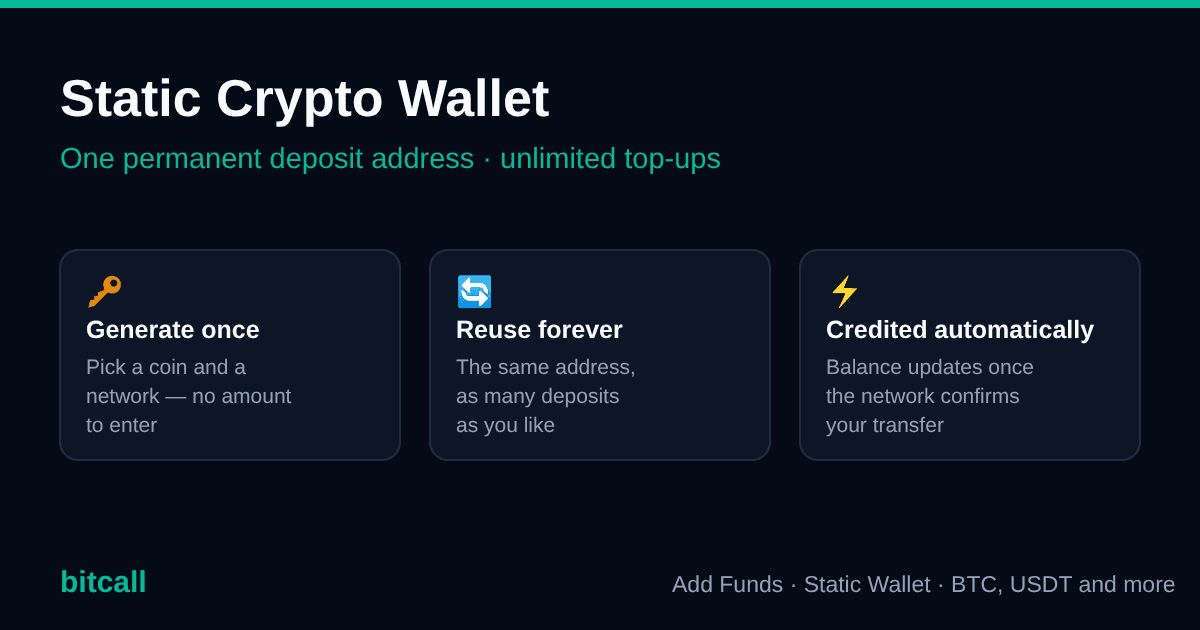
A Static Wallet is a permanent crypto deposit address that belongs to your Bitcall account.
You create it once. After that it is yours to keep — you can send crypto to that same address today, next week or six months from now, and the funds land in your Bitcall balance every single time.
Compare that to a normal crypto payment: there, you tell Bitcall how much you want to add, Bitcall creates a one-time payment address for exactly that amount, and once it is paid the address has done its job. Next top-up, new address.
A Static Wallet removes that step. Think of it as your own account number for crypto — you don't ask for a new one every time money needs to arrive. You save it once and reuse it.
Why use a Static Wallet?
- Generate once, reuse forever — one address, unlimited deposits.
- No amount to enter — you are not creating an invoice, so there is nothing to fill in up front. You decide how much to send at the moment you send it.
- No new payment request per top-up — no invoice to create, nothing to expire while you are looking for your wallet app.
- You don't even need to log in — once you have saved the address, you can top up straight from your exchange or wallet app.
- Deposit whenever you want — any amount above the small displayed minimum, as often as you like.
- Automatic balance updates — Bitcall credits your account as soon as the network confirms the transfer.
- Faster funding — no setup screens between you and the deposit. Copy, send, done.
- Lower minimums than card or PayPal — see Minimum deposits further down.
- Fewer mistakes — no risk of generating a payment for the wrong amount, paying an expired request, or sending to a stale one-time address.
- Ideal for regular users — if you top up every week, or whoever handles your payments isn't the person who logs in to the panel, this is the method built for you.
When should you use a Static Wallet?
Use a Static Wallet when:
- You top up more than once — weekly, monthly or "whenever the balance runs low".
- You want to fund your account without opening the panel first.
- You prefer to send a round amount from your exchange rather than match an invoice to the cent.
- You want to make small top-ups without hitting the standard minimum of the card and PayPal methods.
- Somebody else (an accountant, a colleague, your finance team) sends the funds — anything that arrives at your address is credited to your Bitcall balance.
A one-time crypto payment is still perfectly fine if you are topping up once and don't expect to do it again soon. Both methods are available at any time — see How to Add Balance to Your Bitcall Account for the full list.
Static Wallet vs. a one-time crypto payment
| Traditional crypto payment | Static Wallet | |
|---|---|---|
| Enter an amount first? | Yes — you enter the amount, then the payment is created | No — you just generate the wallet |
| Address | A new address for every payment | One permanent address |
| Number of deposits | One payment per request | Unlimited |
| Expiry | The payment request expires after a while | Never expires |
| Amount you send | Must match the requested amount | Any amount above the displayed minimum |
| Do you need the panel open? | Yes, every time | Only the first time |
| Minimum | Standard top-up minimum (around €10) | A small per-coin minimum, shown on screen |
| Balance credited | Automatically, after confirmation | Automatically, after confirmation |
| Best for | A single one-off top-up | Regular and repeat top-ups |
Before you begin
You'll need:
- An active Bitcall account — create one here if you don't have it yet, then log in at
panel.bitcall.io. - Crypto in an exchange account or wallet app you can send from.
- To know which network that exchange or wallet will use to send (for example Bitcoin for BTC, or TRON TRC-20 for USDT).
No prior crypto experience is needed beyond being able to send a transfer — the panel shows you the address, the network and the minimum on screen.
Step 1 — Open Add Funds and choose Static Wallet
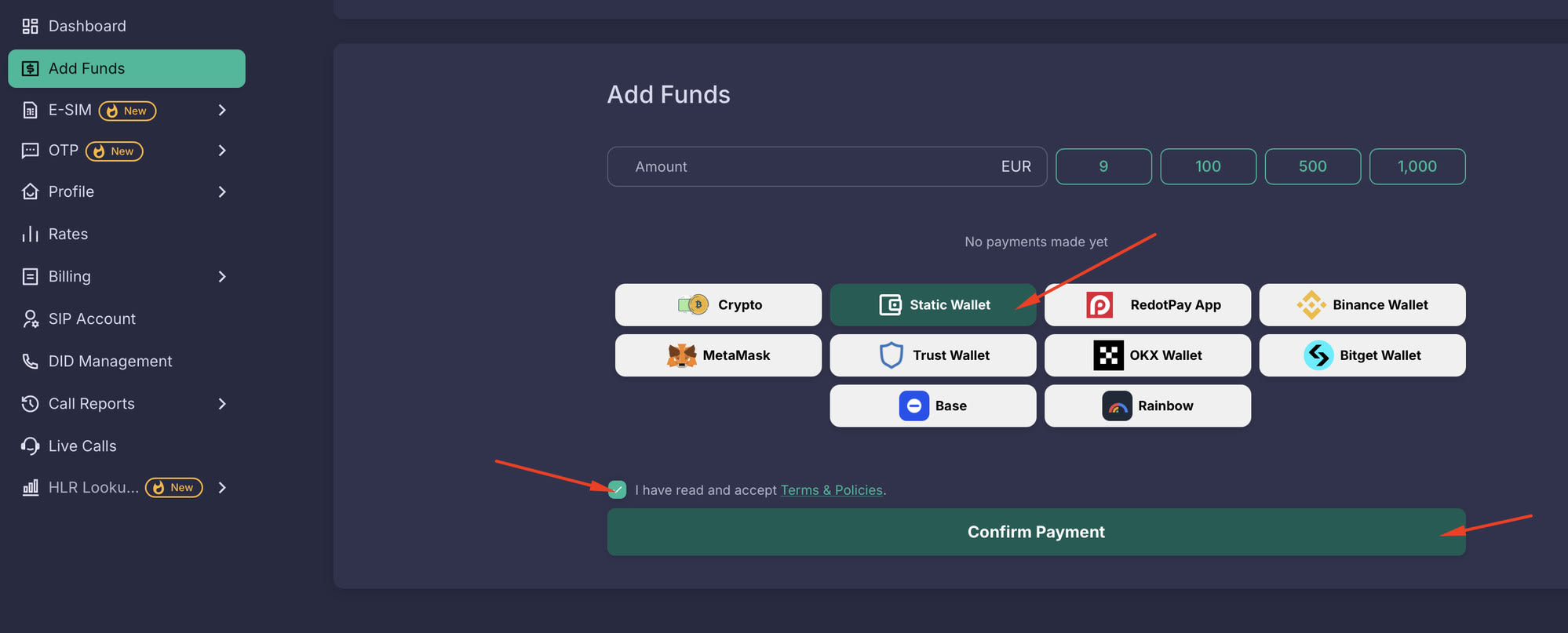
Log in to panel.bitcall.io and click Add Funds in the left sidebar.
On the Add Funds page you'll see all available payment methods. Click Static Wallet.
Then tick "I have read and accept Terms & Policies" and click Confirm Payment to open the Static Wallet screen.
Step 2 — Open your Static Wallet screen
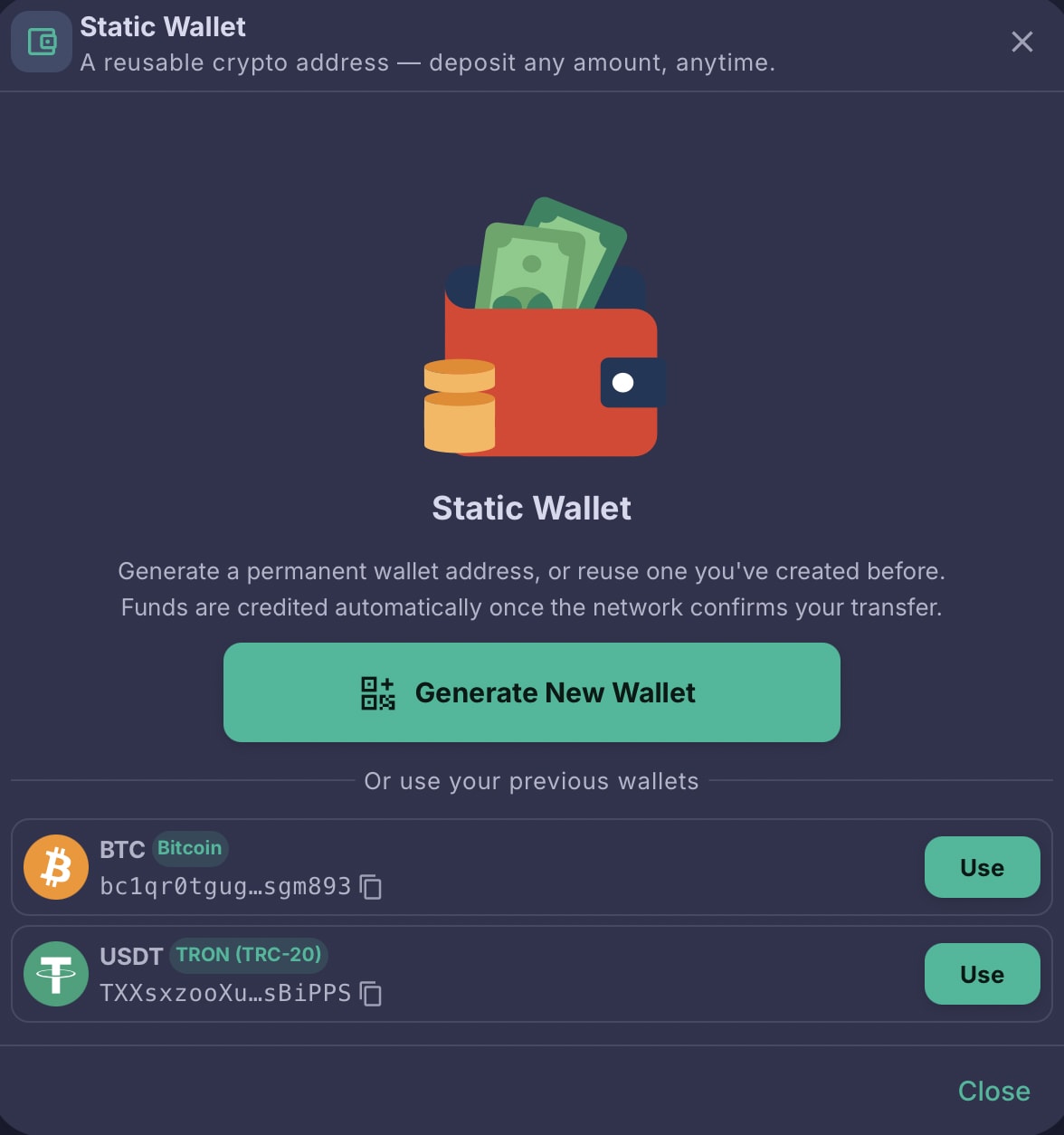
The Static Wallet screen opens. It gives you two choices:
- Generate New Wallet — create a brand-new permanent address for a coin and network you haven't used yet.
- Or use your previous wallets — the list underneath shows every Static Wallet you have already created (for example BTC on Bitcoin, USDT on TRON TRC-20). Click Use to reopen one, or the copy icon next to the address to copy it right away.
If this is your first time here, click Generate New Wallet.
Step 3 — Choose your coin and network
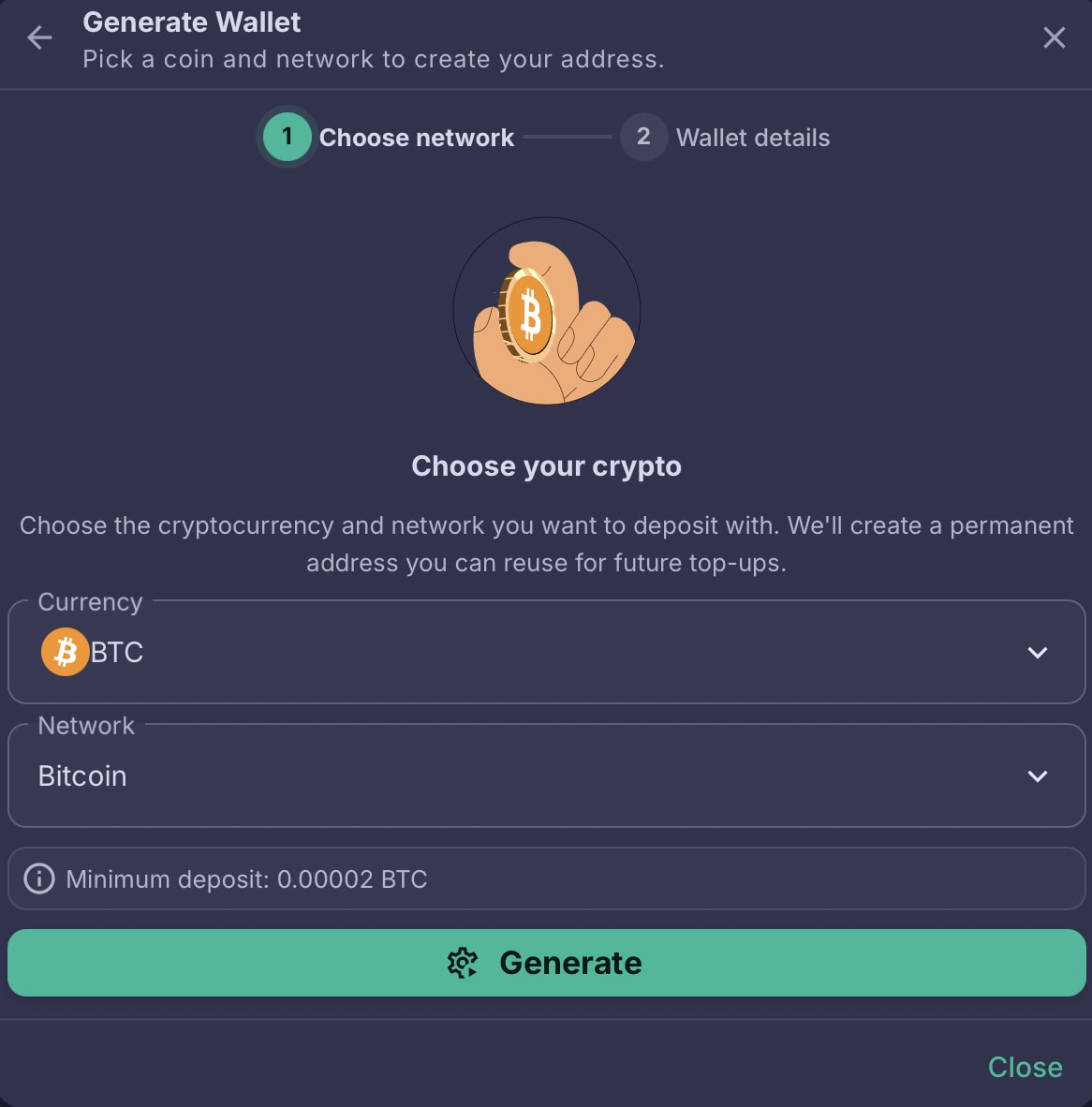
This is step 1 of 2, Choose network. Two dropdowns to set:
- Currency — the cryptocurrency you want to deposit (BTC, USDT and more).
- Network — the blockchain network you will send it over (for example Bitcoin for BTC, or TRON (TRC-20) for USDT).
Underneath, Bitcall shows the minimum deposit for that exact combination — in the example below, 0.00002 BTC.
When both are set, click Generate.
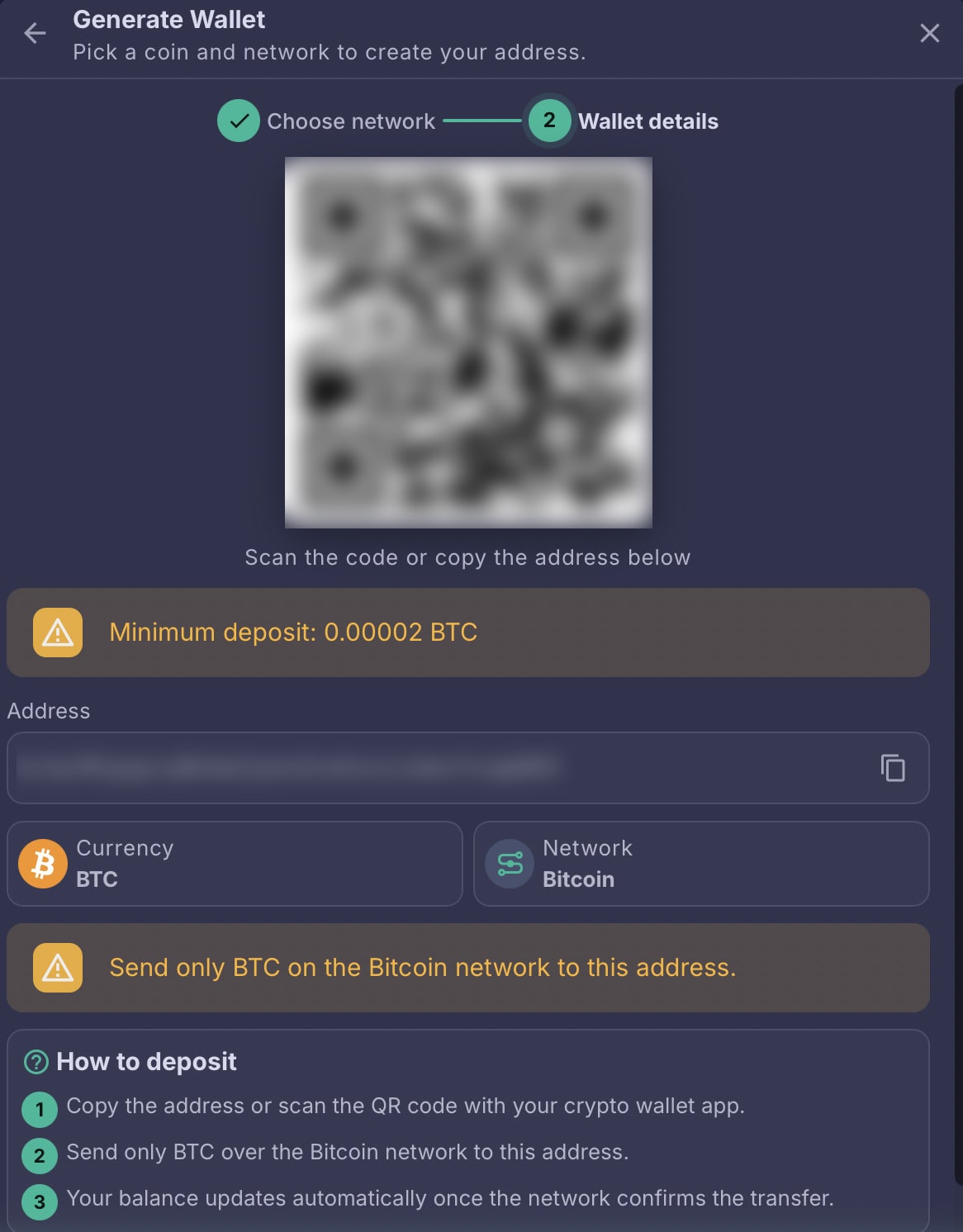
Step 4 — Copy your address or scan the QR code
Step 2 of 2, Wallet details — your permanent address is ready. On this screen you get:
- A QR code — scan it with your crypto wallet app instead of typing anything.
- Your address — click the copy icon on the right to copy it.
- The Currency and Network the address belongs to, so you can double-check before sending.
- The minimum deposit, plus a reminder to send only that coin on that network.
- A short How to deposit recap of the three things that happen next.
Step 5 — Send your crypto
From your exchange or wallet app:
- Choose Withdraw or Send.
- Paste the Bitcall address, or scan the QR code.
- Select the same coin and the same network shown on your wallet details screen.
- Enter an amount at or above the displayed minimum.
- Confirm the transfer.
That's your part finished. Nothing needs to be submitted on the Bitcall side — no form, no email, no support ticket.
Step 6 — Your balance updates automatically
Three things happen, in this order:
- The network confirms the transaction. How long that takes depends on the blockchain and how busy it is — usually a few minutes.
- Bitcall detects the incoming transfer to your address.
- Your balance is credited automatically. The new balance appears in the top bar of the panel, and the deposit is listed in Billing with your other transactions.
Reuse the same wallet any time
Your address does not change, so every future top-up is simply:
- send crypto straight to the address you already saved — you don't even need to open the Bitcall panel, or
- open Add Funds → Static Wallet and click Use next to the wallet in your list.
Every transfer that arrives at that address is credited to the same Bitcall account, as many times as you like, with no extra setup.
You can also keep several Static Wallets side by side — one per coin and network. A BTC-on-Bitcoin wallet and a USDT-on-TRON wallet can happily live in your list at the same time, and each one keeps crediting the same balance.
Minimum deposits — lower than a card or PayPal top-up
Card, PayPal and one-time crypto payments have a standard minimum top-up on Bitcall — around €10, and the exact figure for your chosen method is shown at checkout.
Static Wallets work differently. Each coin and network combination has its own, much smaller minimum:
- It is shown before you generate the wallet, on the Choose network step.
- It is shown again on the Wallet details screen, next to the QR code.
- It is expressed in the coin itself (for example
0.00002 BTC), not in euros, so it moves with the market.
That makes a Static Wallet the better choice for small, frequent top-ups.
Important safety notes
Crypto transfers are final. The blockchain has no "undo", and neither does Bitcall — so a few seconds of checking before you hit send is worth it.
Also worth keeping in mind:
- Respect the displayed minimum. Anything below it may not be credited.
- Copy, never retype. Use the copy button or the QR code, then check the first and last characters of the pasted address before confirming.
- One address per coin and network. Don't reuse your BTC address for USDT, or your TRON address for a different network.
- Confirmation times vary. A busy network can take noticeably longer than usual. Pending is normal; sending again is not the fix.
- Keep the address private-ish. Anything sent to it credits your Bitcall balance, so only share it with people you actually want funding your account.
If a deposit still hasn't arrived after the network has confirmed it, contact Bitcall support with your transaction hash (TXID), the coin and the network — that is everything we need to trace it.
Frequently asked questions
What is a Static Wallet?
A permanent crypto deposit address tied to your Bitcall account. You generate it once and can send crypto to it any number of times; each transfer tops up your balance automatically.
Does my wallet expire?
No. A Static Wallet has no expiry date. Unlike a one-time payment request, it stays valid whether you use it tomorrow or next year.
Can I reuse my wallet?
Yes — that is the whole point. There is no limit on how many deposits you can send to the same address.
Do I need to generate a new wallet every time I want to top up?
No. Generate it once, then send whenever you like. Generating a new wallet is only needed if you want to deposit a different coin or use a different network.
Can I generate multiple wallets?
Yes. You can hold one Static Wallet per coin and network combination — for example BTC on Bitcoin and USDT on TRON (TRC-20). They all appear under Or use your previous wallets.
Can I create wallets for different cryptocurrencies?
Yes. Pick a different currency in the Currency dropdown, choose its network, and click Generate. The new wallet is added to your list alongside the existing ones.
Can I delete a wallet?
There is no delete button, and you don't really need one. An address you stop using simply sits idle in your list — it costs nothing and does nothing until crypto arrives at it.
How long do deposits take?
Usually a few minutes. The time is set by the blockchain network and how congested it is, not by Bitcall; once the network confirms the transfer, crediting is automatic.
Why isn't my balance updated yet?
The most common reasons, in order:
- The network hasn't confirmed the transaction yet — give it a few more minutes.
- The amount sent was below the displayed minimum.
- The transfer was sent on the wrong network, or in a different coin than the address was created for.
- The funds were sent to an older address that belongs to a different coin or network.
If the blockchain shows the transaction as confirmed and your balance still hasn't moved, contact support with the transaction hash (TXID).
What happens if I send the wrong coin?
The address only recognises the coin it was created for, so the deposit will not be credited automatically and in most cases cannot be recovered. Contact support with the TXID — but please treat recovery as unlikely rather than expected.
What happens if I send using the wrong network?
The same answer, and it is the riskier of the two mistakes: funds sent on the wrong network may be permanently lost. Always match the network in your wallet app to the one shown on your wallet details screen.
Can I bookmark this page?
The wallet screen lives inside the panel, so the thing worth saving is the address itself — store it in your exchange or wallet address book. Then you can deposit without opening Bitcall at all. To find the screen again: panel.bitcall.io → Add Funds → Static Wallet → Use.
Is the minimum shown in euros or in crypto?
In crypto — for example 0.00002 BTC. Because crypto prices move, always read the figure on screen just before you send.
Can someone else send funds to my Static Wallet?
Yes. Anything that arrives at the address is credited to your Bitcall balance, so a colleague or finance team can fund your account without needing access to your panel.
Related articles
- How to Add Balance to Your Bitcall Account — every top-up method: card, PayPal, crypto wallets and one-time crypto payments.
- How to Create Your Bitcall Account — if you don't have a panel login yet.
- How to Contact Bitcall Support — for a deposit that has confirmed on-chain but hasn't landed.
How to Add Balance to Your Bitcall Account
No next post
On This Page
What is a Static Wallet?
Why use a Static Wallet?
Static Wallet vs. a one-time crypto payment
Before you begin
Step 1 — Open Add Funds and choose Static Wallet
Step 2 — Open your Static Wallet screen
Step 3 — Choose your coin and network
Step 4 — Copy your address or scan the QR code
Step 5 — Send your crypto
Step 6 — Your balance updates automatically
Reuse the same wallet any time
Minimum deposits — lower than a card or PayPal top-up
Important safety notes
Frequently asked questions
Related articles