How to Change or Manage Your Caller ID (CLI) on Bitcall
How to Change or Manage Your Caller ID (CLI) on Bitcall
Learn how to set a fixed Caller ID, use regex to rotate your CLI randomly, and control whether your softphone or PBX can override it all from your Bitcall dashboard.
What You Will Need
An active Bitcall account (panel.bitcall.io)
A SIP account already set up in your dashboard
A valid phone number to use as your Caller ID (including country code)
Step 1 : Go to Your Caller ID Settings
Log in to panel.bitcall.io.
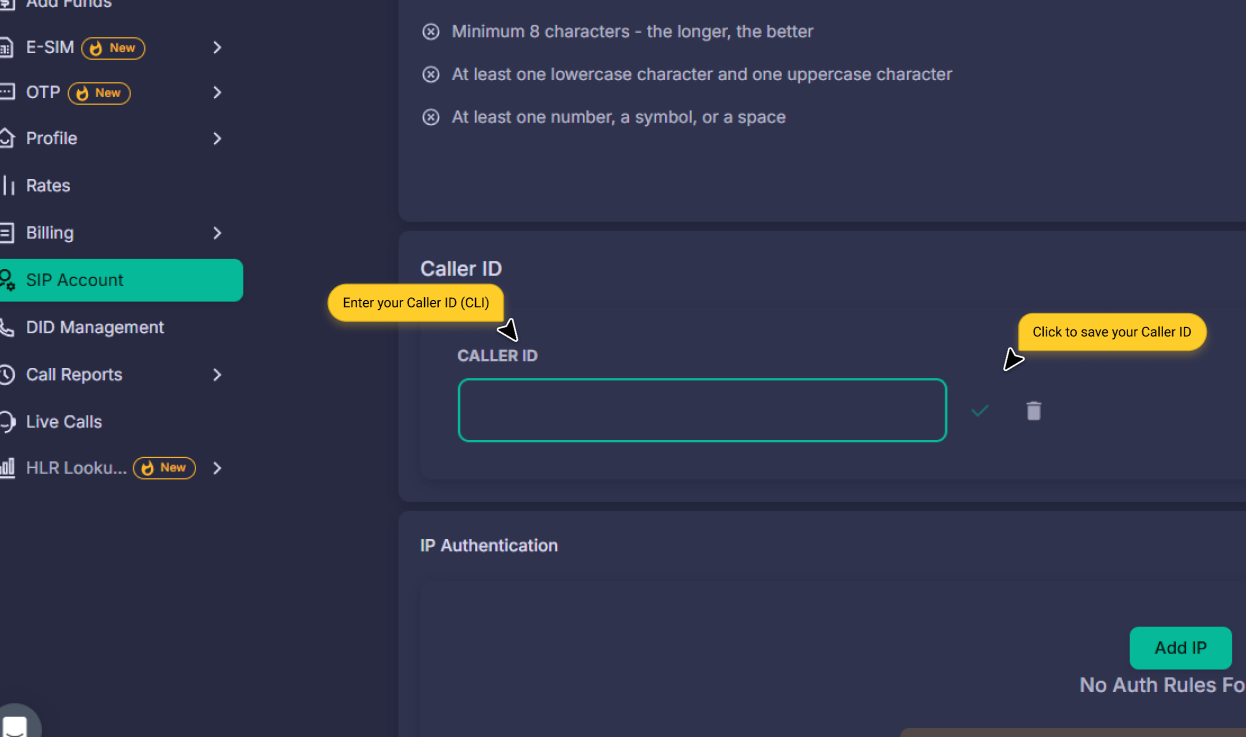
Go to SIP Account in the left sidebar.
Scroll down to the Caller ID section.
Enter your desired CLI in the Caller ID field.
Click the green checkmark (✓) to save.
IMPORTANT
Panel CLI Overrides Everything If a Caller ID is set in the panel, it will take priority over:
Whatever your SIP softphone tries to send.
Any CLI set in your Asterisk, FreeSWITCH, or 3CX server.
If you want to control the Caller ID from your server instead, leave the Caller ID field empty and enable Trust CLI. Bitcall will then use the CLI sent in your SIP headers.
Step 2 : Set a Fixed Caller ID
To always use the same number on every call, enter it in international format (plus sign + full country code):
France:
+33612345678USA:
+14155552671UK:
+447512345678Belgium:
+32491234567
Step 3 : Set a Random Caller ID Using Regex (Optional)
Bitcall supports a built-in regex engine to rotate your CLI randomly on every call. This is useful for high-volume outbound dialing.
Example 1 : Random French CLI
s/.*/33756${R:[1-9]6}/
s/.*/replace everything with what follows.33756fixed French mobile prefix.${R:[1-9]6}generate a random 6-digit number (first digit 1-9).Output:
33756123456,33756987654, etc.
International Regex Examples
USA:
s/.*/1312${R:[0-9]7}/(Generates: 13121234567, Chicago area)UK:
s/.*/4474${R:[0-9]8}/(Generates: 447412345678, Mobile range)Belgium:
s/.*/3249${R:[0-9]6}/(Generates: 3249123456, Mobile)France (Pool):
s/.*/${R:[a-c]1}/; s/^a/337${R:[0-9]8}/; s/^b/3375699${R:[0-9]4}/; s/^c/33756${R:[0-9]6}/;(Randomly picks between 3 prefixes)
Regex Pattern Reference
s/.*/: Match all input replace everything.
${R:[0-9]4}: Generate a random 4-digit number.
${R:[a-c]1}: Pick one random letter: a, b, or c.
s/^a/.../: If result starts with 'a', apply this transformation.
Expected Result
Your Caller ID is saved and active. On every outbound call, Bitcall will use either your fixed number or the randomly generated number. The person you are calling will see the configured number.
Troubleshooting
My CLI is being ignored: Make sure the Caller ID field in the panel is empty if you want your softphone/PBX to control it. The panel CLI always wins!
Regex syntax error: Ensure segments are separated by a semicolon ( ; ) and you are using
${R:[0-9]X}correctly.Wrong number showing globally: Some carriers override CLI. If this happens consistently, contact Bitcall support to verify your CLI is approved for that destination.
No previous post
No next post