How AI Voice Agents Connect to Phone Numbers: SIP Trunking & BYOC (2026)
How AI Voice Agents Connect to Phone Numbers: SIP Trunking & BYOC (2026)
AI voice agents are software — a SIP trunk is what turns them into something a customer can call. Here's how SIP trunking and BYOC work, and how to put Bitcall underneath your agent.
What is a SIP trunk for an AI voice agent?
A SIP trunk is a virtual phone line that runs over the internet. It connects a voice application to the PSTN — the regular telephone network — so the application can place and receive calls to ordinary phone numbers.
For an AI voice agent, the SIP trunk is the part that turns software into something a customer can actually call. The agent handles the conversation (transcription, reasoning, speech). The SIP trunk handles the phone number, the dial-out, and the connection to whichever carrier ultimately delivers the call to a real handset.
Put simply: the AI platform is the brain; the SIP trunk is the phone line. You need both, and they are usually provided by two different companies — the AI platform on one side, and a telecom carrier like Bitcall on the other.
How does an AI voice agent make and receive calls?
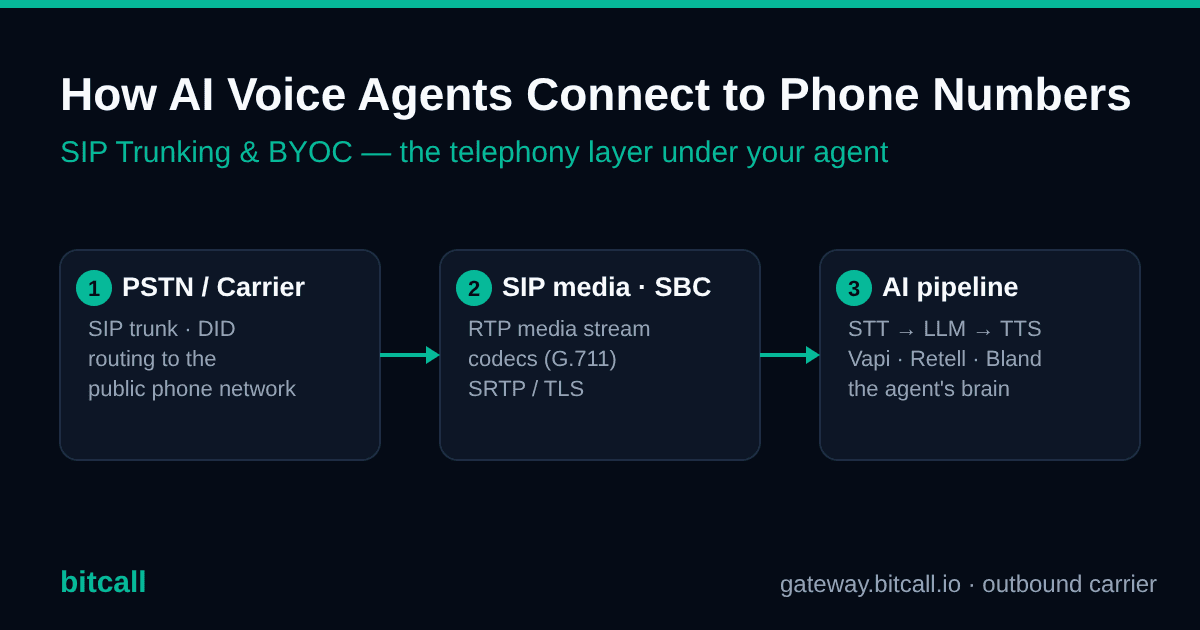
Every AI phone call moves through three layers:
- The PSTN / carrier layer. A SIP trunk from a carrier provides the phone number (a DID) and routes the call to and from the public phone network.
- The SIP media layer. A media server or session border controller (SBC) — built into the AI platform, or your own — terminates the SIP call and passes the audio into the AI pipeline.
- The AI processing layer. Speech-to-text (STT) turns incoming audio into words, an LLM decides what to say, and text-to-speech (TTS) turns the reply back into audio, which is sent back out as RTP (the real-time media stream).
A typical inbound call looks like this:
Caller dials your number → the carrier sends a SIP INVITE to the AI platform's media server → call audio flows as RTP into the STT engine → the transcript goes to the LLM → the LLM's reply goes to TTS → that audio is sent back as RTP through the carrier to the caller.
The SIP trunk is the link between layer 1 and layer 2. The AI platform owns the link between layer 2 and layer 3. Your choice of carrier, codec, and routing affects both call quality and how fast the agent can respond — which is why the "boring" telephony layer is worth getting right.
What is BYOC, and why does it matter?
BYOC stands for "bring your own carrier." Instead of using the phone numbers and minutes bundled inside the AI platform (which are often resold from a single large provider), BYOC lets you connect your own SIP trunk and your own DIDs to the platform.
Teams move to BYOC for four practical reasons:
- Lower per-minute cost. Bundled platform telephony usually carries a markup. Connecting a wholesale carrier directly removes that layer.
- Better geographic coverage. Your own carrier can give you local numbers and competitive termination in regions the platform's default provider serves poorly.
- Your own number inventory and caller ID. You keep control of your DIDs and the caller ID shown on outbound calls.
- Existing relationships and routing control. If you already buy minutes or numbers, you consolidate everything onto one network.
The trade-off is that you configure the connection yourself — but on the major platforms that's a short, well-documented process, covered below.
Which AI voice platforms support your own SIP trunk?
Most do. BYOC is now a standard feature across the leading platforms, though the exact mechanism differs:
| Platform | How you connect your own trunk | Notes |
|---|---|---|
| Vapi | A byo-sip-trunk credential plus a byo-phone-number resource |
Inbound calls are routed to a Vapi SIP URI; username/password auth is recommended over IP auth on shared gateways |
| Retell AI | Custom / elastic SIP trunking | Typically needs a separate inbound and outbound trunk configuration |
| Bland AI | Custom SIP endpoint (BYOC) | Generally requires a bit more setup than Retell |
| ElevenLabs (Conversational) | Via a Twilio integration / SDK | BYOC is reached through Twilio |
| LiveKit / Pipecat / Dograh | You run the SIP bridge / media server yourself | Open-source; full control, more responsibility |
The headline for anyone evaluating providers: if a platform makes phone calls, it almost certainly lets you bring your own SIP trunk. That is the doorway for a carrier like Bitcall to sit underneath any of them.
What SIP trunk settings actually matter for AI voice?
AI voice is more sensitive to the telephony layer than a normal office phone system, because every extra millisecond and every dropped packet is felt in the conversation. The settings that matter most:
- Use G.711. It avoids transcoding inside the AI audio pipeline. Transcoding to or from compressed codecs adds latency and can degrade transcription accuracy. Only use Opus or G.722 if the platform explicitly supports them end to end.
- Keep the media path short. Choose a carrier with routes and media servers reasonably close to where the AI platform runs its inference, so RTP doesn't take a scenic route.
- Standard 20 ms packet timing (ptime). Some platforms support 10 ms for slightly lower latency — check their docs.
- RFC 2833 (out-of-band) DTMF. Needed for touch-tone IVR navigation. In-band DTMF doesn't survive an AI audio pipeline cleanly.
- SRTP for encrypted media, which many AI platforms expect.
- Elastic concurrency. AI campaigns spike. The carrier needs to handle many simultaneous calls without throttling.
This is exactly the layer most AI-platform docs gloss over — and exactly where a telecom carrier's expertise earns its keep.
Why do AI voice calls drop after about 30 seconds?
Direct answer: the most common cause is an RTP inactivity timeout during the agent's "thinking" gaps. While the AI is generating a response, no audio may be sent for a moment. If nothing is flowing, an intermediate device — an SBC, a NAT pinhole, or an RTP proxy — can decide the media stream is dead and tear the call down, often right around the 30–60 second mark.
The fix has three parts:
- Enable RTP keepalives or comfort-noise generation so a low-level stream keeps flowing during silence.
- Raise the RTP inactivity timeout on your media server or PBX to at least 60 seconds.
- Check the media path for NAT problems — make sure the SDP advertises a reachable public IP, not a private one, and that your firewall allows the RTP/UDP port range.
A close cousin of this issue is "the call connects but the agent never responds," which is almost always RTP not reaching the media server at all (wrong IP in the SDP, or a blocked UDP range).
How much latency does the telephony layer add?
Conversational latency is the time between the caller finishing their sentence and hearing the agent begin to reply. Natural conversation needs that to stay under roughly 1.5 seconds.
The important thing to understand is where the time goes. The AI layer dominates the budget; the telephony layer should be a small slice of it:
| Layer | Rough contribution | What controls it |
|---|---|---|
| SIP / RTP network + packet timing + codec | under ~100 ms total | proximity of the carrier to the AI, 20 ms ptime, G.711 (no transcoding) |
| Speech-to-text (end-of-utterance) | ~100–300 ms | streaming STT, good voice-activity detection |
| LLM (first token) | ~200–800 ms | smaller/faster models, streaming output |
| Text-to-speech (first audio) | ~50–200 ms | streaming TTS |
The takeaway: you can't fix a slow LLM with a better SIP trunk — but a poorly chosen carrier (long routes, forced transcoding, packet loss) can absolutely add avoidable delay and hurt transcription accuracy. Get the telephony layer down to its ~100 ms floor and let the AI layer do the rest.
How do you connect Bitcall to an AI voice agent?
Bitcall is the outbound carrier layer that sits underneath your AI agent — the SIP trunk, the routing, and the caller ID your agent dials through. Your agent platform handles the conversation; Bitcall delivers the outbound call to the phone network.
At a high level, connecting Bitcall to any AI voice platform means:
- Create a SIP account in Bitcall to get your SIP credentials.
- Point the platform's BYO/custom SIP trunk at Bitcall: gateway
gateway.bitcall.io, port5060, with your SIP username and password. Username/password auth is the recommended method for AI platforms whose signalling comes from shared servers. - Set the caller ID (CLI) your agent presents on outbound calls, and register it as the outbound number on the platform.
- (Optional) Validate your dialing lists with HLR Lookup before a campaign, so you're not paying to ring dead or ported numbers.
- Top up and place a test outbound call.
Scope today: Bitcall currently powers the outbound side — origination, routing, and caller ID. Inbound calls and your own virtual numbers (DIDs) are on the roadmap, and this guide will be updated when inbound goes live.
Why teams put Bitcall under their voice agent:
- A-Z termination from $0.01/min with per-second billing to 195+ countries — including strong CLI/NCLI routes in Africa, the Middle East, Asia, and Europe.
- No contracts, no monthly minimums, and prepaid top-ups by card, PayPal, or crypto (Bitcoin, USDT, ETH).
- SIP-native with SRTP and TLS, the things AI platforms expect.
- Caller ID (CLI) control and HLR number validation for clean, efficient outbound campaigns.
- Built for high-volume outbound — elastic concurrency and routes tuned for call-center and campaign traffic.
Frequently asked questions
Do AI voice agents come with a phone number? Most offer a bundled number to get started, but it's usually resold and marked up. For production — especially anything international or high-volume — teams connect their own SIP trunk and DIDs (BYOC) to control cost, coverage, and caller ID.
Can I use my own carrier with Vapi or Retell? Yes. Vapi supports a custom "BYO SIP trunk," and Retell supports custom/elastic SIP trunking. Both let you connect a carrier like Bitcall instead of using their default telephony.
What codec should I use for an AI voice agent? G.711, in almost all cases. It avoids transcoding in the audio pipeline, which keeps latency down and protects transcription accuracy. Only switch to Opus or G.722 if the platform supports it end to end.
Why does my AI agent connect but never respond? The call's audio (RTP) isn't reaching the AI media server. The usual causes are a private IP being advertised in the SDP, or a firewall blocking the RTP/UDP port range. Fix the media path and the agent will hear the caller.
Is bringing your own SIP trunk actually cheaper than the platform's numbers? Often, yes — the platform's bundled minutes typically include a markup over wholesale termination. The savings grow with volume, and BYOC also unlocks better international rates and your own caller ID.
Related resources
Bitcall help center:
- Set Up Your First SIP Account
- Trusted IP vs. SIP Credentials: What's the Difference?
- Change or Manage Your Caller ID (CLI)
- Set up Bitcall on 3CX (Trunk Mode)
- What is Bitcall and How Does It Work?
Bitcall + AI voice setup guides:
Vapi Outbound Calling: How to Use Your Own SIP Trunk (and Why)
Временный номер для SMS: бесплатный или платный?
Related posts
Vapi Outbound Calling: How to Use Your Own SIP Trunk (and Why)
Best Outbound SIP Trunk Providers for AI Voice Agents (2026)
Retell Outbound Calling: How to Use Your Own SIP Trunk (and Why)
На этой странице
What is a SIP trunk for an AI voice agent?
How does an AI voice agent make and receive calls?
What is BYOC, and why does it matter?
Which AI voice platforms support your own SIP trunk?
What SIP trunk settings actually matter for AI voice?
Why do AI voice calls drop after about 30 seconds?
How much latency does the telephony layer add?
How do you connect Bitcall to an AI voice agent?
Frequently asked questions
Related resources
Bitcall Team
authorНужна дополнительная помощь?
Не нашли то, что искали? Наша служба поддержки готова помочь.
Свяжитесь с нами